
SolidWorks 2010:  Awesome Tables!
Sun, 02/21/10 – 11:55 PM | Comments

Sometimes when testing newer versions of Software you discover some “unreported” enhancements that really can be a time saver.  That type of enhancement is the source of this post, but first we’ll take an overall …

Read the full story »
SolidWorks News

SolidWorks Reviews

SolidWorks Tips

SolidWorks Video Tips

SolidWorks World

Home » Product Reviews

Dell M6400 Review

Submitted by Ricky Jordan on Tuesday, June 9, 2009Comments

dell_precision_m6400

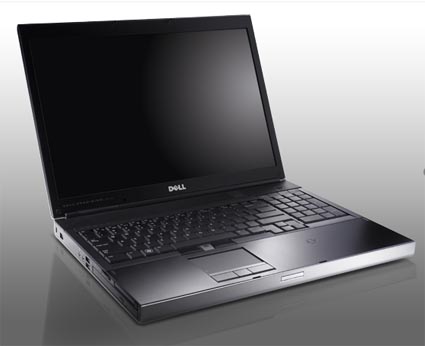
Hardware reviews is not something I have done much on this site, but when I mentioned sharing my thoughts once my new Dell M6400 came in, I got some comments and even some e-mails asking me to post my thoughts.  So…here goes!

First, a little background.  I was running a Dell M90 that was a little over two years old.  In mid April, my system suddenly refused to boot up.  After some diagnostics run by our hard working IT department, it was determined that the video card was bad.  Dell had no replacement video cards in stock at the time, so they offered to replace my M90 with a brand new M6400.  I jumped at the chance and after about 10 days, my new system arrived!

Since it was a replacement system, I didn’t have much control over the specifications.  They were picked out by Dell to be “equivalent or better” to my M90 system.  Here are the specs:

Intel® CoreTM 2 Duo P8700 (2.53GHz 3M L2 Cache, 1066MHz) Dual Core
Windows XP Professional 32bit
17″ UltraSharpTM WUXGA (1920×1200) LCD Display
NVIDIA Quadro FX 2700M, 512MB Discrete
4.0GB, DDR3-1066MHz SDRAM, 2 DIMMS
160GB Hard Drive, 7200RPM with Free Fall Sensor
8X DVD with Cyberlink Power DVDTM
9 Cell Battery
Intel® WiFi Link 5100 802.11a/g/n Draft Mini Card
Internal English Backlit Keyboard

Now if I was setting the specs, I would have gone for a faster processor, 8GB of RAM, the FX3700 video card, and a larger hard drive.  I wasn’t going to complain though.  :-)   I was getting a pretty good deal here.  One upgrade that I had IT do was swap out the 160GB hard drive for a 320 GB drive.  Having lots of space is nice!

When we received the system our IT group put our “standard enterprise” software package on it which included MS Office 2007, Norton Endpoint virus protection, and a few other odds and ends.  I picked up the system and of course immediately installed SolidWorks.  I had to hit the ground running ASAP.

There were three major features that I immediately fell in love with on this system.  The first is the Numeral Pad on the keyboard.  Yeah, it’s a BIG laptop…but that is what you are going to have to live with if you truly want a mobile workstation.  Having a FULL keyboard is nice when I’m on the go.  The second feature is the backlit keyboard.  I never thought about how handy of a feature that would be, but I absolutely love it!  If you are in a dark room it is a must.  Dell did a very nice job in that it immediately comes on when it senses any action around the keyboard.  The third thing is probably the most surprising – the display.  I had the same WUXGA 1900×1200 on my M90, but I swear to you this one seems brighter and more crisp that what I had before.  (Yes..I knew where the brightness and contrast settings were on the previous system.)

We left Windows XP 32 bit on the system and I was off to the races.  Performance was good.  Everything seemed faster than my M90 as it should be.  Since I didn’t get a chance to run any benchmarks with the old system I don’t really have anything to compare to.  The graphics performance was good.  Not what I would call the best, but good.  I experienced a few glitches here and there, even with the latest SolidWorks certified drivers.  Before I really had much time to tune or troubleshoot the graphics issues, I ran into a slightly larger problem.  This problem really didn’t have anything to do with the system.  The current project I am working on is a large and complex assembly that had been pushing our machines to the limits of 32 bit operating system.  We turned on the 3GB switch and I had some SERIOUS stability issues.  Graphics performance was slow and unpredictable.  There were other “weird” issues that started popping up.  I almost immediately disabled it and everything returned to its previous state.  Looking back, I’m not quite sure why I started out with 32 bit, but after a few weeks, it was apparent that I was going to need a 64 bit OS very soon.

So, after running the system for a few weeks with Windows XP 32 bit.  The M6400 “headed back to the shop” (IT) for a re-format to Vista 64bit.  Why Vista 64 over XP 64?  Well, I relied on some of the best resources around.  My fellow users of the SolidWorks Community.  After polling many of my fellow SolidWorks users across the land, all were consistently saying I should go to Vista 64 bit.  Not only has it proved to run FASTER than XP 64 bit in several benchmarks, it seems to have less bugs, which if you think about it really makes sense.  Do you think Microsoft will be tripping over itself to fix bugs in Win XP 64 bit?  I didn’t think so either.  (A big thanks to Anna Wood, Devon Sowell, and Lou Gallo for their valued advice!)

Since I am in the middle of a “BIG” project (that is probably an understatement), we decided to purchase another 320 GB hard drive and put Vista 64 bit on it.  (They are only about $130.00 right now).  This way, if I had some show stopper issues with Vista 64, I could swap out the drives and be back up and running in Win XP 32bit almost immediately.  Also as part of this “upgrade” we added an additional 4 GB of RAM to the system.  Total cost for the RAM was not far off the price of the new hard drive.

This was my first full-time experience with Windows Vista.  I must say overall, I really like the new user interface.  Yeah, it is overkill in some areas and Vista  is a resource hog, but when you have 8 GB or RAM and no 2GB limit, suddenly that really isn’t all that big of a deal.  One thing I learned quickly is that the Certified video driver from SolidWorks requires that the Windows Aero interface be enabled.  During setup, our IT group had disabled it and I didn’t notice right away.  Props to Anna Wood and Ron Bates on the SolidWorks Forum for reminding me of this.

Outside of having to go out and find some new printer drivers and a few issues with Adobe CS3, the transition to 64 bit has been smooth.  You can run 32bit or 64bit browsers which comes in handy since Adobe Flash is not yet supported for 64 bit browsers.  (Come on, seriously, what is up with that Adobe!!)  Not having to worry about running out of virtual memory has been REALLY nice!  A few months back I was hoping to hold off on going to 64bit until Windows 7.  But since my work required it, I have become quite comfortable with Vista.  One of the things I REALLY like is the fact that you can setup your own shortcuts in the left side bar of your “My Computer” windows.  Another nice feature in Vista is that you can open multiple windows using Windows Photo Gallery.  This has come in handy for some Technical Editing I am doing for an upcoming book on SolidWorks by Alex Ruiz.

There were some posts on the SolidWorks Forum where users were having issues with the system when it goes into hibernate mode.  This was supposed to be addressed with a new BIOS from Dell.  I always turn hibernate mode off and shut down my system at night, so I can’t say for sure that all has been fixed there.  It appears that many folks that were having the issue before are no longer experiencing the same problems.  I’ve also heard of a few issues with the FX3700M video card.  Since I don’t have one in my system, I can’t really comment on that.  If you are considering getting one with that card, I would check out the SolidWorks Forums.  All of the recent comments seem to indicate there are less problems with that now with the BIOS revisions and some new Certified SolidWorks Video Drivers.

I hope some of this information is helpful to those interested in purchasing an M6400.  So far I am REALLY happy with the system and would recommend it to anyone looking for a good mobile workstation.  If you have any questions, feel free to post them in the comments and I’ll answer them if I can.

Stay tuned…more to come!

UPDATE:  Check out my review of this system as I upgraded it to Windows 7!

Share and Enjoy:
  • StumbleUpon
  • Digg
  • Technorati
  • del.icio.us
  • Facebook
  • LinkedIn
  • email
  • Google Bookmarks
  • FriendFeed

Related posts:

  1. Dell M6400 with Windows 7! Well…after Vista x64 started giving me a few “blue...
  2. HP Mini 110 Review Last year while attending SolidWorks World 2009, I started...
  3. Laptops, Moving, & More! There has been quite a bit going on lately...
  4. I’m BAAACCKK! A month ago when I started this whole buying a...

Related posts brought to you by Yet Another Related Posts Plugin.

  • Ed
    You know they say big things come in small packages...well that's not true when it comes to computer hardware...cause when things get hot especially when you are clocking an nvidia quadro series in a laptop environment you better have a bigger lot...anyhow the m6400 sucks because dell always fails to pay attention to the details. Despite the aluminum clading this big bad laptop shrouds itself into it's still unable to come up once it's hot docked...yes this titan of computing is unable to wake up after the eject button it's activated on its homebase, the infamous E series port replicator...
  • Ed,

    We all get frustrated sometimes..and with the problems you have experienced it is understandable. With that said...leaving a comment laced with profanity is not a very professional way to deal with issues like this.

    We have middle school and even sometimes grade school kids that come to this site to learn about SolidWorks, so we must keep it as clean and professional as possible.

    I had considered removing your comment, but instead have cleaned it up a bit so that your voice can still be heard here which I think is very important. Especially to users who are considering purchasing this product.

    I'm sorry to hear that you've had issues with the docking. I've had many laptops that don't react very well to being removed from the dock while the OS is still running...so I usually try to avoid those cases when possible. I agree with you though..this should work better.

    As far as the wake up issues you have been having...I have set mine only to hibernate when it is on battery and have bumped up the time a bit from the default 10 minutes. (I think that is what it was...going off memory here.)

    Have you tried downloading the latest BIOS from the Dell site? There were some documented wake up issues on the earlier BIOS versions for the M6400.

    Hope things get better for you.

    Best Regards,

    Ricky
  • core71
    Thanks for great and helpful review!
    Could you please explain little bit more, how big was your "BIG" project? For example: how many parts you had to assemble, what was the RAM usage when all necessary assemblies and parts were opened, were you able to work with all parts fully resolved, etc etc - or was it more like animation / photorealistic rendering?
    Your answers would help me to decide should I choose M6400 with quad core extreme or should I prefer M6500...uhh!...money...money..money... ;-)
  • Sorry for the late response on this. Ran a 4000 component assembly in SolidWorks on Vista x64. It ran fully resolved...but obviously a little slower...but nothing that impedes the ability to do the job quickly. RAM utilization was no higher than 5 gigs out of 8 available...and that was with a lot of other programs open.

    This was all done on a Dual Core processor. Since this laptop was a replacement for my M90 (which had a video card failure), the processor was almost the lowest available for this model.

    I have since swapped out with our IT group and now have a Quad Core M6400. It ran Anna Wood's SolidMuse puchholder benchmark about 20 seconds faster than my previous M6400 with the Dual Core.

    Ricky
  • Suresh
    Would you happen to know if one can run both XP and Windows 7? I mean install one on one HD and the other on the Other HD (Since it has 2 HD's)?
  • Hmm...not sure on that one. All I can say is that I have not tried it. I would assume that you could dual boot it....but I don't know if that can be done across two hard drives.

    An alternative approach might be to run Windows 7 and then use the Windows XP mode that MS released as part of Win7.

    Ricky
  • SATA
    Thanks Ricky for the post.
  • George
    Dell is offering me a similar system to replace a Vostro laptop. Have you had any difficulties with this system since posting your review?
  • Hi George,

    Aside from the sound driver skipping a bit here and there, I have had no problems with the system and am extremely happy with it. If you are running SolidWorks, I recommend 64 bit Vista or Windows 7.

    Ricky
  • George
    Thanks Ricky. It seems like a no-brainer to take this offer from Dell, but I'm not at all familiar with the M6400 other than researching it over the past day.

    I would definitely need to upgrade it; throw out the 4 1GBs and put in 8GB; I need Windows 7 Ultimate 64bit and they're offering a lesser 32bit version. It comes with two 80GB hard drives and I want to keep my 320GB drives (which Dell says are RAID-compatible.) Otherwise he seems to be vastly superior to the Vostro 1710.

    I hope, anyway!

    Kind regards,
    George
  • George,

    Best of luck with your new system. Keep us updated on how it is going for you.

    Ricky
  • Ralph
    I hear yea...I have a m6400 and it screams!!!
  • cheap computers
    Im glad there is a way to disable the sleep button, but that is not what I asked for, I want one that I can set to disable itself when I have a monitor plugged in and the machine in use.
  • Brilliant review. This has made me more interested in purchasing the M6400. Gotta break my piggy bank as soon as possible. lol
  • The whole Dell line of Precision laptops have come down in price through the years, but are still not cheap by any means. I'm glad you found the review useful.

    Ricky
  • Nice review, Ricky. Thanks for sharing.

    Devon
  • Nice review of the Dell M6400! I still haven't had that much time to play with mine yet... I think it is a beautiful machine; I like the sharp edges.

    I do like the backlit keyboard! As you said, it is VERY nice in a darkened room. Also, I was wondering where the media controls were, and found them accidentally one day. The trackpad doubles as the controls, you have to hit the little "swirl" on the trackpad, and you get some nice glowing buttons on there!

    My wife's Inspiron we bought last summer has the numeric keypad, and I was wondering why the Inspiron's had it, but the mobile workstations didn't (I had a M6300 at the time). I am kinda torn on the numeric keypad...it is nice to have, but it makes the keyboard be off-center, which bugs me a little bit.

    I also got the web cam with mine, and it takes some nice, crisp pictures and video; I was impressed with the quality!

    I haven't had any issues with Hibernating, and that's pretty much what I always do. I do seem to have some issues with the wireless card - I got the Dell N. Don't think it's my router, as our other wireless boxes don't have issues. I haven't had it out anywhere else to test.
  • Awesome Ricky. I looked at one of these at the Dell booth in Orlando this week. So nice. Their set-up was fast whatever it was. I was seriously torn between wanting that and the HP I talked about last week. great review too. thanks for linking to the forum post about the vista thing.
blog comments powered by Disqus