
SolidWorks 2010:  Awesome Tables!
Sun, 02/21/10 – 11:55 PM | Comments

Sometimes when testing newer versions of Software you discover some “unreported” enhancements that really can be a time saver.  That type of enhancement is the source of this post, but first we’ll take an overall …

Read the full story »
SolidWorks News

SolidWorks Reviews

SolidWorks Tips

SolidWorks Video Tips

SolidWorks World

Home » SolidWorks Reviews, SolidWorks Tips, SolidWorks Video Tips

SolidWorks Electrical Routing – Part 1

Submitted by Ricky Jordan on Tuesday, July 7, 2009Comments

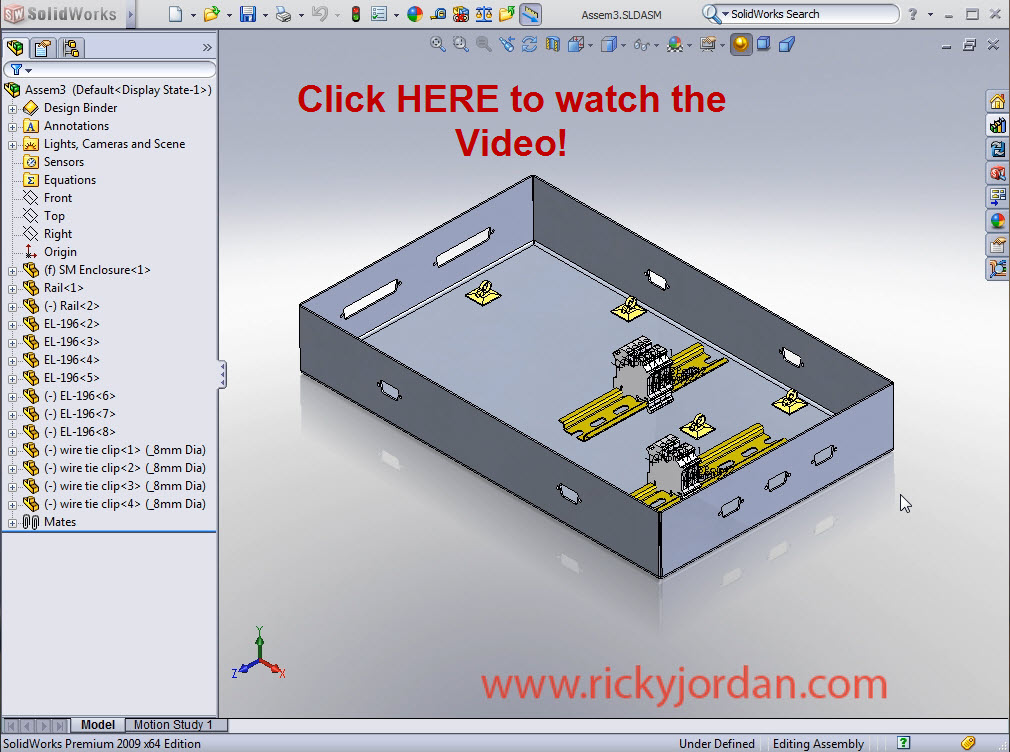
After talking about it for quite some time here on the site, today marks the first installment on a series of posts on SolidWorks Electrical Routing.  In this first example I guide you halfway through the creation of an Electrical Harness using what I call the “on the fly” method.  This particular method is often used when you don’t have any electrical wiring information to import in the form of a “From/To” list.  In this example we have an electrical enclosure that contains several connectors along with some terminal block connections.  We know in general where the signals are routing from and to, but don’t yet have any detail on the number of signals or any pin to pin connections.  This is a quick way to get some accurate wire lengths.

I originally wanted to continue on and show how to manually insert electrical wires in this harness, but the length of the video would be almost doubled.  We will save that for Part 2!  In later posts I’ll go into some of the important details of the Routing package which include more information on the sub-assembly structure, Connection Points, Route Points, and special in-context capabilites that are only present in the routing package.  To watch Part 1 simple click on the image below to load the video.

e-routing_part1videolink

The videos on this site should be much improved now in the way the flash video loads thanks to a recent upgrade to Camtasia Studio 6.  Let me know if you have any problems viewing it.  I still have a few new things in store for the videos in the future as I get time to explore some new tools at my disposal.

Stay tuned….more to come!

Share and Enjoy:
  • StumbleUpon
  • Digg
  • Technorati
  • del.icio.us
  • Facebook
  • LinkedIn
  • email
  • Google Bookmarks
  • FriendFeed

Related posts:

  1. SolidWorks Electrical Routing – Part 2 Most users of SolidWorks Electrical Routing use the product to...
  2. SolidWorks Video Tip: Roll View I’m sure all of us have had this happen before. ...
  3. SolidWorks 2010: Hole Wizard! It’s been a while since I have had a...

Related posts brought to you by Yet Another Related Posts Plugin.

  • Diana
    Ricky,

    Thanks for showing how to start working with harnesses. I do have a question about adding components to the routing library and adding connection points to them.
  • You might want to see this new website that has thousands of science project kits and books and other resources, including electrical science projects. You can go to the Science Projects Store at http://www.scienceprojects-1.com. This is a very large resource site for science projects.
  • Hello Mr. Vital,

    Thank you so much for letting me know about this school science web site. After checking it out I sent it to all the teachers and administrators that I know. That goes to places on the other side of this third planet from the sun. :) Thank you very much.
  • larry_m
    Very insightful little tutorial, I work as a Dallas electrician and I must say that all the procedures you used to get all the routing done are correct. I am impressed! As for SolidWorks I will need to know all about it if I want a promotion.
  • Hi Larry,
    I'm also a retired electrician but use SolidWorks often. It is a great tool when used for such work. Ricky Jordan is one of the coolest types of teachers of SolidWorks. He has already taught me many things that I did not know about the software and I have been using it now for about five years but not in a work situation. I use it to create science projects for teachers all around the world.
  • Richie
    Hi Ricky this is Richie. Great post. This probably doesn't mean much but to all of us electricians we use to call those stick on square tabs Ty-rap bases. I guess a catalogue number or part number needed to be created to identify it with a different name. Great post.
  • Richie,

    I've heard those things called all different kinds of things. You are right, Ty-rap bases are probably the most common one. Paduit pads have also been a popular one in our area. I think I called them "clips" in the video. Probably the reason for that is that is the terminology that is being used to describe them in the project I am currently working on.

    I'm glad you enjoyed the post. It is my hope that these videos will encourage more folks to check out Routing. It is a GREAT product for determining route paths and wire lengths!

    Ricky
blog comments powered by Disqus