
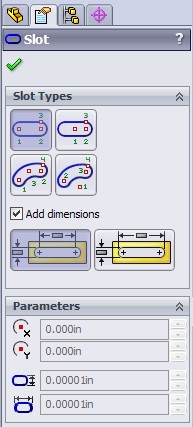
New in SolidWorks 2009 is the Sketch Slot feature. This sketch entity allows you to quickly create both Straight Slots and Arc Slots in a variety of creation methods. When you use this type of sketch entity and an Extrude Boss or Cut is created from it, a temporary axis is created not only at the arc center points, but also at the center point of the slot. The PropertyManager for the Slot sketch entity is shown below.
Click on the image below to see a quick video demonstration on the various methods available to create a Sketch Slot.
Stay tuned…more to come!


Add New Comment
Viewing 5 Comments
Thanks. Your comment is awaiting approval by a moderator.
Do you already have an account? Log in and claim this comment.
Steve
Do you already have an account? Log in and claim this comment.
Previously ( in the sw beta ), "add dimension" also work for rectangular, circle....Today when I try in PR1, I cant find the add demension.
How about you...?
Do you already have an account? Log in and claim this comment.
Go to Tools->Options->System Options->Sketch
Make sure that the option for "Enable onscreen numeric input on entity creation" is checked.
After enabling this and enabling the "Add dimension" option in the PropertyManager for circles & rectangles, you should see your dimensions appear automatically.
Ricky
Do you already have an account? Log in and claim this comment.
work fine now...
Cheers !
Add New Comment