
« SolidWorks Forum: New Look & Features | Main | HOLY COW! »

February 06, 2008

SolidWorks Tip: Holes in a Formed Cylinder

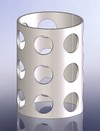
Cylinder_slotHere's a SolidWorks Tip geared a little more towards the less experienced SolidWorks users out there.  I based this tip on a question I received from a student in the UK.  The question asked was if it was possible to extrude-cut a pattern of holes on a flat sheet then roll the sheet into a cylinder shape.  Click HERE to see the video that shows how to do this.

Thanks to Harald Bjorndalen for submitting the question.  Stay tuned....more to come! 

TrackBack

TrackBack URL for this entry:
http://www.typepad.com/t/trackback/861717/25883752

Listed below are links to weblogs that reference SolidWorks Tip: Holes in a Formed Cylinder:

Comments

Way cool, Ricky. I love the videos.

Steve

Hi
please send me tutorials of solidworks
the subject of tutorials : molding and welding and drawing
thanks a lot

Hi Hamed,

Everything I have is on this site. We'll see if some of the subjects you mentioned make it onto the site in the future.

I recommend you check out the video tutorials at www.solidprofessor.com and www.inspirtech.com

Best Regards,

Ricky Jordan

Hi

I am trying to cut multiple holes on a curved surface, perforated for ventilation in Solidworks. I do not want random holes. How do I create perforated holes that align straight on each angle. An example of what I'm trying to achieve is the MUJI Cd player
http://swissmiss.typepad.com/weblog/2005/11/muji_cd_player.html

Help is greatly appreciated.

Cheers,
Irene

Irene,

You could easily create the pattern shown at the link you posted by creating a fill pattern of the hole, or by creating one of the spokes in a hole feature and then doing a circular pattern.

Brian
http://www.cadfanatic.com/

Post a comment

If you have a TypeKey or TypePad account, please Sign In