
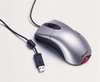
One might think it would be easy to pick out a mouse for use with SolidWorks, but when it comes to me, I hasn’t been for quite some time. For the last couple of years, I have had to sacrifice comfort for function.
 My first “favorite” mouse was the Intellimouse Explorer 3.0. I got my first one back in 2001. I immediately took advantage of the two side buttons on the upper left by programmed them to perform Copy and Paste functions. (Just take a minute and ask yourself how often you use those functions in Windows.) Still to this day I think this is one of the best pieces of hardware Microsoft has built.
 In early 2004 I went to buy a new mouse and to my surprise the Intellimouse Explorer had been redesigned. This was the version that introduced the “tilt-wheel”. I decided to give it a shot, but at the same time was a bit anxious about the tilt-wheel. My fears were not unfound I discovered later that day. Everytime I tried to use the wheel as a middle button, the cursed thing would end up tilting to the left or right. I kept it for about a day before taking it back cursing the entire way.
 After what seemed like 30 minutes testing out mice on the showroom floor at CompUSA, I came across the Logitech MX500. This one had the side buttons for my Copy and Paste and had a really comfortable feel to it, so I bought it. I discovered the next day that there was one tiny sticking point. Instead of it being with the hardware itself, it was software related. For some reason, my Copy/Paste buttons wouldn’t work right in SolidWorks. It would work correctly for text selections, but not SolidWorks features and sketches. SolidWorks and Logitech each said it was the other’s issue that was causing it. I liked the mouse well enough I decided to keep it anyway. Overall it was a very good mouse and was used solid for 3 years until it recently started turning single-clicks to double-clicks.
So there I was…back at CompUSA testing one mouse after another. One thing I realized quick was that there are now more cordless mice than corded mice. I just don’t have the need for a cordless mouse. Especially since this one stays at my desk all the time. I happened across a Logitech MX400 that had the side buttons and a REALLY comfortable feel, so I gave it a shot. (It does have a tilt wheel, but it isn’t housed in a carriage assembly AND you can disable them!) To my delight, Logitech had implemented a new mouse software called SetPoint with this mouse. FINALLY, my Copy and Paste buttons are working like a champ in SolidWorks! To top it all off the mouse retails for a very respectable $39.99. Here is a picture of the MX400 Performance Laser Mouse.


So what is your favorite mouse for SolidWorks?