
 When working in SolidWorks sometimes it is necessary to convert Model Views in a Drawing to Vector entities (lines and arcs) so that the view is NOT tied to the geometry of the solid model. An example of this would be a view of an electrical connector’s pin numbers for a cable/harness drawing. In cases like this, the model “is what it is” and it really isn’t necessary to tie an external reference to a solid model file that will not be changing.
The tried and true method for this in the past has been to create a DXF or DWG file of the SolidWorks Drawing containing the view, then import the neutral file back into SolidWorks. While this works nicely, it can be a little time consuming saving the file to a location and going thru the import wizard just to get the view converted. With the introduction of DWGeditor, there is now a little easier way to do this.
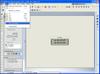
 If you select the Drawing View in SolidWorks, you can go to Edit->Copy to DWGeditor. This copies the view for a direct paste operation into DWGeditor. This of course converts the Drawing View to lines and arcs. You can then window-select the view in DWGeditor and copy the entities to the clipboard (Edit-Copy). Once the data is in the clipboard you can paste it (Edit->Paste) back into a SolidWorks Drawing or Sketch.
Stay tuned…more to come!