
SolidWorks 2010:  Awesome Tables!
Sun, 02/21/10 – 11:55 PM | Comments

Sometimes when testing newer versions of Software you discover some “unreported” enhancements that really can be a time saver.  That type of enhancement is the source of this post, but first we’ll take an overall …

Read the full story »
SolidWorks News

SolidWorks Reviews

SolidWorks Tips

SolidWorks Video Tips

SolidWorks World

Home » SolidWorks Video Tips

The “S” Key Experiment Part 1

Submitted by Ricky Jordan on Friday, December 5, 2008Comments

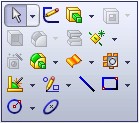
Ever since the “S” key shortcut command was added in SolidWorks 2008, I’ve heard some users comment that they use it quite often.  This lead me to question whether or not you could function inside of SolidWorks in an efficient manner by JUST using the “S” key shortcut menu.  NO CommandManager.  NO Toolbars.  Just in case you aren’t familar with the “S” key menu, you simply press the “S” key on the keyboard and the menu appears in close proximity to your cursor.  Since the “S” Key menu can be completely customized, I have decided to test this out by adding my most common commands to this menu.  The menu is context sensitive.  For example, when modeling parts, you have a specific menu for Edit Part mode and a completely different menu when in Edit Sketch mode.  After some customization of both previously mentioned menus, I set out for my first modeling experiment in the below video.  What I am modeling is not important.  The important part of this experiment was to see how easy it was to depend mostly on the “S” Key menu.  You can access the video by clicking on the image below.
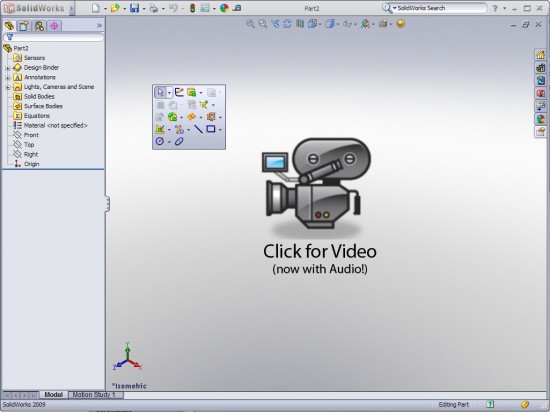
Note:  Due to excessive load times in some of my most recent videos, I am testing some new video settings with the above video.  I did have to sacrifice a little on the video quality, but the load times for the video should be MUCH better than before.  Let me know what you think about the new video settings.

This post will be the first of a few more on the subject of the “S” Key Experiment.  I will include posts in the future that utilize the “S” Key menu in the Assembly and Drawing environments along with some updates on my testing in the Part Environment.

Stay tuned….more to come.

Share and Enjoy:
  • StumbleUpon
  • Digg
  • Technorati
  • del.icio.us
  • Facebook
  • LinkedIn
  • email
  • Google Bookmarks
  • FriendFeed

Related posts:

  1. SolidWorks Electrical Routing – Part 1 After talking about it for quite some time here on...

Related posts brought to you by Yet Another Related Posts Plugin.

  • Mike
    Thanks,

    very interesting!

    Regards,
    Mike
  • Thanks Mike!

    I'm still running with NO Toolbars!

    Long live the shortcut bar.

    Ricky
  • Steve_Calvert
    Looking forwars to using the "S" key once our company gets to a version that has it, your write up is a good view of what's to come for us. Thanks...

    Steve
  • No problem Steve! I just posted Part 2 tonight which shows the use of the "S" Key shortcut toolbar in use in an Assembly!

    Ricky
  • As the experiment continues, I find after 4 days I am adding either 1 or 2 commands per day now as required to complete the shortcut menu and make if functional for each active section.
  • Hi Rod,

    I agree. I have added 4 or 5 more commands since I posted the video. I'll have a post up for Part 2 of the experiment soon. :-)

    Ricky
  • Pilun
    Nice video, with the lower resolution you might want to use a plain color background so you don't see the rings of the fewer colors.
  • Pilun,

    Yes, I agree. I had already done the video and voice capture when I realized that the change in my flash settings effected the viewing of the gradient background. I'll have it better for the next one. :-)

    Ricky
  • Todd Engle
    I linked the thumb mouse button to the S button.

    If you use a Spaceball, you can't choose S as a button assignment
    In the keyboard assignments, change the toolbar assignment from S to Insert.
    Now you can assign Insert to a Spaceball button (and mouse button).
  • Len Mar
    Nice job
    Didn't know it was that easy to customize.
  • Whoa, this is kind of weird...I was just reading yesterday where Josh had commented somewhere about running with just the S key shortcut menu and I decided to try it too! I spent a little while yesterday tweaking my S key menu and am trying to only use it.

    I still have the Command Manager running, and plan on continuing to tweak the S key menu as needed until I am running almost, as Jeff Ray mentioned last year, "with a blank screen".
  • Awesome post Ricky! I absolutely love the "S" key and use it for 98% of my commands. I do still have the Command Manager on for a back up but I think that will be coming off and I am going to try this experiment with you. Thanks for the post!

    P.S. The video looked great!
  • Add the extrudes to your "S" key tool bar when in sketch mode. This would save you some clicks because you wouldn't have to leave the sketch.
  • Vadim
    The S key is one of my favorite enhacement too. But I begun use it only in SW2009 :)
  • Well, pretty impressive video Ricky. I had not really put a lot of stock into the S key even after reading all the posts and comments everyone had put up. After seeing it in action, now I am believing. So, i will start today off with some S key customization.

    Also, the video loaded rapidly. However, for me to get the video up I have to hit the link twice. The 1st time just opens a new tab in Firefox with nothing going on. The second time it has the "Screencast Loading" comes up.

    Update:
    Ok, went cold turkey on the command manager. This is forcing me to add the parts I use the most as I go along. So far, so good. Moved my mate macros over to the shortcut just now. Much better having them right by cursor instead of looking to the tool bar.
  • Rod,

    Glad to hear your have joined "The Experiment"! I'm working with Assemblies this afternoon too and have really enjoyed using the "S" Key. I don't miss the CommandManager a bit! :-) I'll do a video post over the weekend sharing my experiences with Assemblies.

    Ricky
  • It is going well so far. It is hard getting used to just hitting the S key.
  • Load Time 68 seconds - Doesn't help with Australian Broadband speeds!!!!
  • I have been running with only the S key since SW2008 first came out. One of my favorite enhancements in SW2008.

    Cheers,

    Anna
  • Hi Anna,

    I kinda figured there were already folks out there using it this way. Congrats on your new site layout. Looks VERY nice! I just updated your link in my Blogroll.

    Ricky
  • Ricky,

    Thanks... It was time for a refresh for sure. Your new home is shaping up nicely too!

    Cheers,

    Anna
blog comments powered by Disqus