Entries from March 2008 ↓

2008 SWUGN Technical Summit - Nashville

In just over a week (Wednesday April 9, 2008) SolidWorks users from all over the Southeast will gather in Nashville, TN for the 2008 SWUGN Nashville Technical Summit.  Last year’s event set a record for attendees with over 115 people!  If you live and work anywhere near this event, you don’t want to miss it!  Cost for the event is only $40.00 which includes a continental breakfast and lunch.  Click HERE to register.  SWUGN Technical Summits give more users the opportunity to experience an event that has many similarities to one day at SolidWorks World.  Attendees will be treated to opening and lunch sessions along with access to 5 breakout sessions featuring 10 topics to choose from.

The presenter line up this year includes Richard Doyle, Kevin Stuart, Dana Parrish (All from SolidWorks Corp.), Brad Williamson, Gary Hall, Richard Hall, Jeremiah Davis, and yours truly!  I will be preparing a brand new presentation on working with Imported Geometry.  You can see a complete line up of the sessions at the Nashville Summit page on the SWUGN site.

This year’s lunch session will include a 1-Minute Tips trivia contest.  SWUGN Technical Summit attendees will be invited to submit their own 1-Minute Tips prior to the event.  Submitting your tips is easy.  Send a complete text description to Richard Doyle (rdoyle@solidworks.com).  You can include models if desired, or even a video if you have the capability.  If any questions come up, someone will contact you for clarification.  Then, at the SWUGN Summit in Nashville, Richard will demonstrate each 1-Minute Tip submitted for the attendees, and we’ll all vote for our favorites.  The top submissions will walk away with some great prizes like 3D Connexion Space Explorers, SolidWorks branded iPods, or free admission to SolidWorks World 2009 in Orlando.  You might even see your 1-Minute Tip on the SolidWorks website.

I can’t say enough how exciting these events are and how valuable they can be for everyone from the SolidWorks beginner to the SolidWorks expert.  Don’t miss your opportunity to network with SolidWorks users from all over the Southeast, gain some valuable knowledge of SolidWorks, and win some GREAT prizes!

I hope to see you in Nashville.

CircuitWorks acquired by SolidWorks

SolidWorks announced today the acquisition of Priware Limted, the maker of CircuitWorks.  You can get more information on this by checking out the SolidWorks Press Release and Priware website.

The exciting part of this announcement is that starting with SolidWorks 2008 Service Pack 4, CircuitWorks will be included as part of SolidWorks Office Premium.  (As a Premium user I almost did cartwheels in my cube this morning.)  Existing Premium customers can download a 90 day copy of CircuitWorks today.  (Yes, it’s already there at the Customer Portal.)  Once the 90 day period runs out users will need to move to SP 4.0.  You can find out all the specifics by checking out this FAQ document.

I work with custom PCB designs quite often so this announcement will definitely have a positive impact on how we work with our ECAD PCB layouts in SolidWorks.

Stay tuned…..more to come!!

Is it a Toolbox Part?

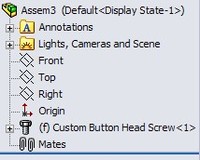
ToolboxicononIf you use PDMWorks Workgroup and SolidWorks Toolbox, you may have run into this issue. If you setup your PDMWorks Vault to NOT check in Toolbox parts, SolidWorks can recognize Toolbox parts in one of two ways. You can identify a directory which will direct PDMWorks to classify all files within that directory as Toolbox parts (set in the PDMWorks Workgroup VaultAdmin) or the part can be detected as a Toolbox part due to a marker that is set in the document properties. When a part is “marked” as a Toolbox part in this way the Toolbox icon appears next to the part when viewed inside a SolidWorks assembly.

So if you don’t check in Toolbox parts, then why would you care? A problem I have run into a few times occurs when I have made a COPY of a toolbox part (therefore separating control by the Toolbox database) AND wish to check it into PDMWorks Workgroup. The marker in the file will NOT allow you to check the part into the vault.

The document property marker is NOT visible in the custom properties or any other place that I have found. So how can you change it? The answer to this question lies within a utility that is provided with your installation of SolidWorks. You can turn the Toolbox part marker OFF with this utility. It can be found with your installation folder in the following subdirectory: SolidWorks\Toolbox\data utilities. The name of the utility is sldsetdocprop.exe

Setdocproputility_3When you run this utility you can set the “Property State” (marker) to Yes or No. You can apply this property setting change to specific files or entire directories. You can view the current status of a file by using the “Show Selected Property” button. The “Update Status” button at the bottom will apply the settings you have selected in the interface.

TooboxiconoffIf you want to copy a Toolbox part and check it into your vault, you pretty much have to use this utility. Adding or removing the marker also effects how the part is shown in the assembly. When the marker is turned off, the Toolbox Icon in the assembly is replaced by the normal icon for parts.

Stay tuned….more to come!

SharePoint

The company I work for has recently implemented Microsoft SharePoint 2007 for our internal intranet.  I am pretty new to the software but have found it very interesting to say the least.  I’ll report more here as I learn more about the software and its collaboration capabilities.  One of the things I am most excited about is a SharePoint site that I will soon have access to that will allow better collaboration in sharing data and communicating with our customers.

If any of your "Power Users" out there with SharePoint have any recommendations or comments on your experiences with it, I would love to hear it.

Stay tuned….more to come!

Bloggers and Press

If you have been frequenting some of the SolidWorks Blogs here lately, you can’t help but find a link back to Roopinder Tara’s CAD Insider Blog where he has been discussing the differences between the Bloggers and the members of the CAD Press.  If for some reason you’ve been living under a rock like Patrick Starfish, you should check it out.  The posts and comments left have been some of the most enjoyable Blog reading I have done in quite some time.

I’ll add a little flavor of my own to the subject.  I was fortunate enough to have been invited to SolidWorks World the last two years as a member of the press.  Both years I have met numerous members of the CAD press and I must say that each and every person I have spoken with has been very courteous and genuinly interested to hear about what I do as a Blogger.  Some of them I have even mentioned by name in my Blog posts.  The history of the CAD industry has always intrigued me and I’ve heard some really interesting stuff from some of the veterans of the CAD Press.

The way I see it you probably get more detailed technical information from the Bloggers.  With the CAD Press you get some of the technical details along with perspectives on how these new features or announcements stand in the CAD industry as a whole.  I really think the two groups complement each other very well and result in some very interesting reading!

Stay tuned….more to come!

HOLY COW!

No, I have not fallen off the face of the earth…but it sure feels like it.  Things have been beyond hectic for me the last few weeks.

I am working on a pretty intense project right now that I cannot talk about.  Let’s just say it involves something for the good of our country.  :-)

Along with this, my entire family has been going through cycles of sickness for about the last two weeks.  I think everyone has now gotten over the two or three forms of crud going around so hopefully nothing but wellness will follow.

I’m working on posting an interview with Rick Chin that I did while at SolidWorks World but have run into some audio difficulties.  Hopefully I will have that resolved soon and can post it.

Hang in there….I promise there are many good things coming!