
« SolidWorks Tip: Context Toolbar in Sketches | Main | SolidWorks World 2008: Finally in San Diego! »

January 15, 2008

SolidWorks Tip: Connectors Anyone??

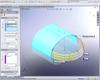
ConnectorsHere is a quick little video tip on connectors which can be found in Boundary Surfaces, Sweeps, and Lofts.  Most users that utilize these features often are aware of the connector options available which can help you shape the surface (in particular the UV flow). 

This tip shows how to utilize a single surface edge for multiple profiles in a Boundary Surface without having to create construction sketches.  With the technique shown, you can also set limits for the use of connectors on edges.  The model example is pretty simple since the part I used this tip on recently cannot be shown publicly.

CLICK HERE TO ACCESS THE VIDEO TIP.

Stay tuned, MUCH more to come!!

TrackBack

TrackBack URL for this entry:
http://www.typepad.com/t/trackback/861717/25168150

Listed below are links to weblogs that reference SolidWorks Tip: Connectors Anyone??:

Comments

Ricky,

I'm afraid your link didn't work for me.

Worked for me, Charles. BTW, Ricky, is this available in SW06?

Steve

Charles - That is strange. I tested it on my machine and a few others here at work and it works just fine on all of them. The video is Flash based (Gives the best quality by far) so you might want to go to the Adobe website and make sure your flash player is up to date. E-mail me if you still can't get it to work after trying this and I will get you a version in an alternate format so you can see it.

Steve - The Selection Manager was new with SolidWorks 2007, so I don't believe this is available in SolidWorks 2006.

If my memory serves me correctly, I think I have heard that both of you will be at SolidWorks World. I'm looking forward to the opportunity of meeting you both. If you see me, flag me down. :-)

Best Regards,

Ricky Jordan
http://www.rickyjordan.com

Ricky, I apparently have problems with my computer at work and typepad. I was unable to post that I was indeed able to view the video about 5 minutes after my previous comment. Thanks for posting it!

Unfortunately, I won't be at SWW, but enjoy!

Post a comment

If you have a TypeKey or TypePad account, please Sign In